

Games Practical Project Development Blog - Week #2

This Weeks and Week 3's posts will be written retroactively as I fell behind on updating this blog, however I did document the dates working, so these blog posts are still accurate to the week.

This Week started by further developing my level generation, completely reworking the Level Generation for the grid style from before, then increased the scope of it to include walls and corners. This finished the first version of my level generation, and was ready to move on to my second pillar.


After getting this level generation improved and finished, I iterated upon my interaction system, discussing it with a friend, we decided for my purposes it would be better to use a call function, and bind that function upon overlapping an objects range. This allows me to store the interact event within the interacted blueprint itself, rather than the interact component. Going forward this will be much better for the project.

Now that this was set up, I made a test interact-able object to ensure the call functions work. To test this I quickly set up a bed blueprint and date system. This could potentially be used further down the line for passing days to get closer to payment deadlines and refill the players health between dungeon runs. To do this I set up a quick UI showing the current game date, using real world days and months, then in the function to progress the date it checks if the month or years need to increase as well, and reset the days to 1 for the new month or year.
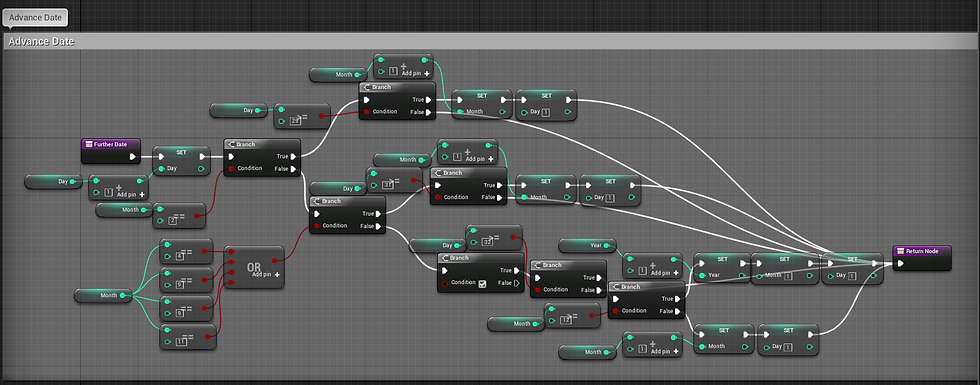
Now that this is set up, I call the function in the day transition UI, refreshing the level with a quick fade in/fade out animation.

This works without any issue, and ensures that the new interaction call events work correctly. After this I set up an incredibly simple Master NPC, that can talk to you. They will always open with a hello, before cycling through random sentences. These interactions can be seen in the video at the bottom of the blog.
After this, I quickly blocked out a sword, added it to the players hand bone, and altered the players animation to hold this sword rather than having it just clipping through the hand.

Finally for the end of the week I played around with the camera angle of the game, as I'm still not content with the playing angle. Without a doubt this is still something I will need to play around with and alter, as I'm not content with where it ended up.


Comments