

Games Practical Project Development Blog - Run up to the End

Well guys, its definitely been a while since the last blog post, and a lot has changed since then. The project has advanced in almost every way you can imagine, but unfortunately I fell completely off of planning and writing blog posts, and put my focus entirely on the project for the remainder of my time at University. This post will be extra long, so I hope you've got some free time before reading on! Throughout the images, you'll see the good old UE4 mannequin has been retired, in favour of some characters from the "Modular RPG Heroes Polyart", available here:

Firstly, the FPS problem that was left as a cliffhanger last time, the solution ended up being quite the simple one, but one that avoided my thought process for far longer than I'd like to admit. While generating the level, each cell needs to be set to movable to get set into the correct places. Once the level is laid out, I then run through each cell that was spawned, and change the movability to Static. This simple change has put my FPS from 20-40 on average, to being solidly maxed on 120 consistently.
Next, I want to discuss the main focus of my project, the Cellular Automata, and it has evolved massively from the state it was in previously, including some actual art and lighting! After this was a lot of improvements to almost every section of the blueprint, far too much to discuss in length while showing images, so below is the large majority of the blueprint, broken down with quick descriptions of what each section does.


Next thing that needed attention was the dialogue system, which had been criminally under developed up to this point, simply existing off of a random int and a print string. As you can see below the ui matches the camera and characters.


For future facing and scaling reasons, I made sure to make the specific names and NPC dialogue incredibly flexible, making use of public text arrays for both the names and dialogue, as well as an option for cut scene specific dialogue, this can be entered in the level editor or at spawn, along with a max number of dialogues so the game knows when to start looping text after exhausting the dialogue options.


After this, as you may have noticed from the above gifs, the players HUD needed to be improved from the very plain Green rectangle for health, and plain text for the date, gold and loot. Along with a more stylish look, I gave the gold and loot symbols rather than text to keep the HUD more concise and less test busy. I also added some numbers above the players health bar so the more attentive can have a much more accurate reading of how much health they have, and what sort of damage the enemies are currently dealing per swing.

Still on a polishing rush, I decided that if the player is expected to return to the Hub on a fairly regular basis, it would have to have something more going on, and why not follow the mantra of the rest of the game. So now, there is a low chance on returning to the hub, that there are some very ambient raining noises outside, to really sell the passage of days with procedural weather. This then evolved into a much lower chance if its already raining to cause a thunderstorm, randomly interrupting the rain to flash lightning outside the window, followed shortly after by the crack of thunder somewhere.
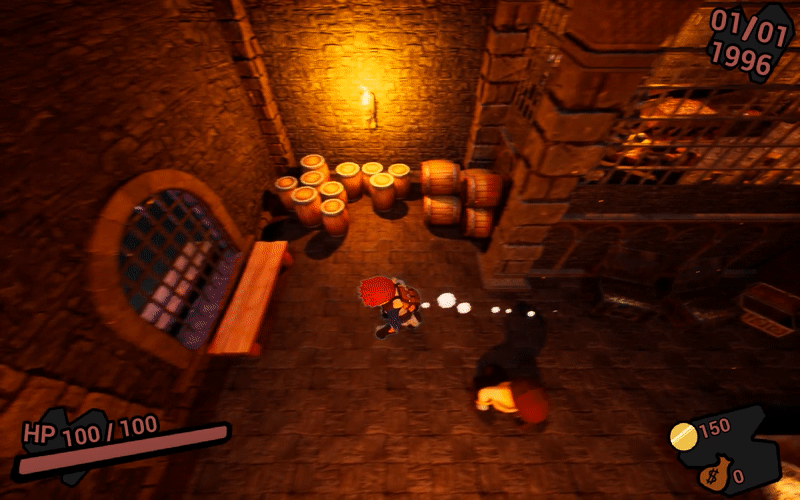


Wanting to ensure the player didn't suffer from visual fatigue, I needed to make sure the different floors started to feel different too. In order to set this up, I decided to use the same system I use to check the deepest floor the player has reached, in multiples of 5, and if 5 floors have past, the colour will change.


After this was all set up, I knew I had to spend a chuck of time on the moment to moment game play, with an improved level generation and look, the combat needed to be improved both mechanically and visually to keep up. I made sure to get plenty of public testing on every change I made along the way.


Along with these changes, the AI has gotten a whole lot smarter, initially exploring the map freely until their attention is caught by the players antics, at this point the AI will chase down the player, attempting to get in close enough to swing, however if the player outmanoeuvres the enemy, and manages to get outside of a certain distance from the pursuing AI, it will give up and return to freely roaming the level.


With the combat a lot juicier, I felt the player needed something other than combat to justify exploring through these generated levels, so I set up treasure chests to be an exceedingly rare spawn throughout the dungeon, with loot that scales to the level, much above the average loot dropped by enemies during combat. Well worth keeping your eyes peeled for!

Still unhappy with the look of the visuals for death from before, I continued to tweak and change how they worked. Eventually settling for the players core outline, along with any nearby enemies outlines being the only things visible through the fade to black. With this gif, also shows the new enemy created, being a looter, only spawning on the same floor as the player died on, they hold on them the loot the player was carrying at the moment of their death. This gives the player a hail Mary attempt to reclaim the lost good they had on them. This enemy doesn't have the means to attack the player, but will try to get away from the player while choosing points to run to.
Reaching the end of development, ironically, I decided to set up a main menu to wrap the game up nicely. This menu holds a stripped down copy of the hub level, only keeping anything that is in view of the camera, I then set up a few different camera angles, that the menu takes on randomly at run time, as a final random selection, and in a meta sense to start the game as it means to go on. With this, and an incredibly simple start and quit, the game was finally in a state I could call it ready.


Finally, I want to leave you with a quick play through of the game from the start. Thank you so much for reading my ramblings, and following my progress throughout the project. I plan on continuing the project in my personal time, and may keep the blog going, but if this is the last post made, it's been an amazing ride, and I hope you enjoy. In the video you can see the on screen controls at the time of play, and experience the audio work I put in better than any text of GIF could show. I will be attempting to package the project to upload to Itch, but unfortunately due to changing UE4 engine version, the version of Visual Studio 2017 causes issues packaging, and causes failure.


Comments